The Best Podcast Equipment Guide for 2024
[More Podcasting Guides coming soon]
Some of the links on this page are affiliate links. Podcast Hero will earn a commission if you make a purchase using the best podcast equipment guide. Thank you for your support.
Podcasting can be complicated
If you are just getting started as a podcaster you are probably confused about podcast equipment. What is the best podcast equipment for a new podcaster?
There are 100’s of products from dozens of manufacturers and getting your head wrapped around what recording equipment is best for podcasting is tough.
Podcasting can be complicated. Some podcasters have complicated podcast equipment configurations and you may think that you need a fancy sound treated studio with thousands of dollars in gear to get started. This is not true.
You can start a podcast that sounds great with an inexpensive USB Microphone. Assuming you already have a computer, you won’t need anything else.
Keep this in mind as we look at all the equipment you can use to create podcasts. You don’t need all this gear… podcasting doesn’t have to be complicated.
Podcasting Can Be Simple
In the old days (not that long ago) we used to have to use music gear to produce our podcasts. We had to take a mixer that was designed for music production and make it work for the needs of podcasting. Now, there are many equipment manufacturers that make recording equipment designed for podcasting. This makes life easier for us podcasters!
Podcast Equipment Made For Podcasting
Podcast Digital Recorder and Audio Interface for Podcasting
To get started podcasting you don’t need any of this equipment. You can start recording your show with an inexpensive USB microphone and some recording software.Even if you have a more complex show with remote interviews you can do so with VoiceMeeter (Windows) or Audio Hijack Pro (MAC).
You don’t have to buy additional equipment although it will make your podcast production easier. If you don’t have the budget for podcast equipment don’t let that stop you from getting started in podcasting. Just skip down to the microphone section if you don’t want an audio interface or digital recorder.If you want to have a complete podcast studio or if you are going to buy XLR microphones you will need to look at audio-interfaces or mixers.
Podcast Digital Recorders for Podcasting
A Digital Recorder is a great addition to your podcasting setup because you can use it in a variety of ways.
You can use your digital recorder to record sound seeing tours as you are at events and out in the field. You can record interviews directly into the digital recorder using its built in microphone or plug your handheld microphone into it if it supports XLR inputs.
You can also use a digital recorder with your mixer to record your podcast through the line-in input and eliminate the risk of losing a recording due to software crashes.
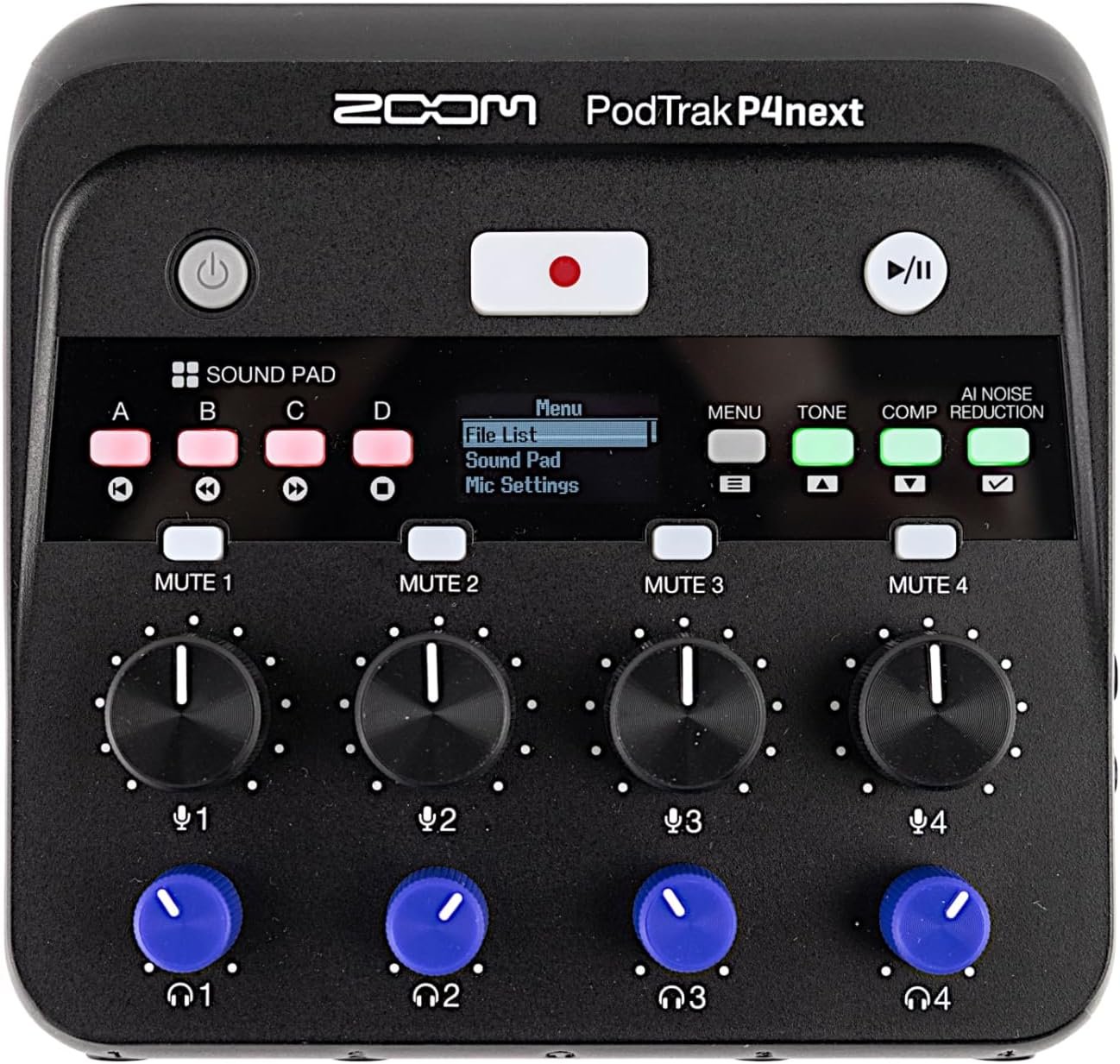
Zoom Podtrak P4

A perfect digital recorder for podcasters
The Zoom Podtrak P4 and the new Podtrak P4 Next are the perfect all-in-one solutions for podcasting.
It is a multi-track digital recorder, stereo mix audio interface, and portable podcast studio. The Podtrak P4 features four XLR microphone inputs with individual-level volume control, so you can easily connect up to four microphones.
Read our FULL REVIEW and RATING of the Podtrak P4
The Podtrak P4 can record to the internal SD Card in Multi-Track but does NOT record to your DAW as an Audio Interface in Multi-Track – just a stereo mix.
If you need a multi-track audio interface then this is not the device for you!
The Podtrak P4 Next has additional features including recording multitrack to a DAW and new AI noise reduction and EQ features built in.
Who is this for?
Need a small mobile podcast recorder or audio interfaceDoes not need more than 4 people on microphonesDoes not need more than 2 people on mic if the phone and computer are connected.You want to record without a computer

More Digital Recorders
Podcast Audio Interface for Podcasting
An audio interface is a device that takes your analog microphones (XLR) and converts the signal to digital and brings the signal into your computer through a USB connection. An audio interface is not as complex as a mixer but it takes up less space and works well for many podcasters.
There are a variety of Audio-Interfaces to choose from. They range from simple, single input and output devices to more advanced multi-input and multi-output devices.
When choosing an audio interface you need to look at how many in-studio microphones you will need for your show. If you will have yourself and one co-host then an audio-interface with two XLR inputs will be fine. But what if you have an in-studio guest… then you will need an additional input. I usually recommend getting more inputs/outputs then you need to make room for exceptions and growth.
A great audio interface for podcasters


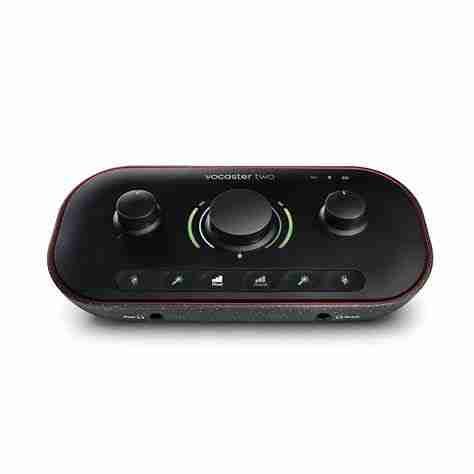
The Focusrite Vocaster 2 is a great audio interface designed with podcasters in mind.
It is a multi-track audio interface that can bring in a smart phone and a computer. The Vocaster Two features two XLR microphone inputs with individual-level volume control.
Read our FULL REVIEW and RATING of the Vocaster Two
The Vocaster Two DOES record into your DAW in multi-track so it is perfect for easy podcast editing!
Who is this for?
Need a small audio interface to save desk spaceHac imperdiet! Sodales aptent.Does not need more than 2 people on microphonesCan connect a phone and a computer to bring in calls to the show.You don’t need to record without a computer.Great for zoom calls and webinars using your studio gear with your phone or PC.
More Audio Interfaces
Mixers for Podcasting
A mixer gives you a lot of control over your audio and allows you to set up a mix-minus for bringing in remote guests via Skype or another service. In the old days, we had to setup a mix minus ourselves using cables and it could be very confusing.
What is a mix-minus?
A mixer mix-minus allows you to bring in audio from in-studio or remote guests allowing them to hear the entire recording minus their own voice. If they can hear themselves they will hear their own voice echoing back at them which can be highy distracting and makes it difficult to speak.
It is possible to produce podcasts without a mixer. You can use a virtual mixer like VoiceMeeter to do everything a physical mixer can do (including a mix-minus) but you will still need an audio interface if using XLR Microphones.
It is possible to set up a mix-minus with an audio interface but it is much easier on a mixing board.
If your mixer supports USB you can record directly into your computer without an additional USB audio interface.
If you have an older mixer that doesn’t have USB you can use a simple audio interface to do the job.
Some mixers are multi-track which will let you record yourself and your guests in separate tracks for easier editing.
However… we don’t have to worry about a mixer mix-minus or any of these other issues anymore now that there are mixers designed specifically for the needs of podcasting!
All of the new gear designed for podcasters has built in mix-minus and other features for podcasters.
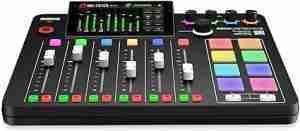
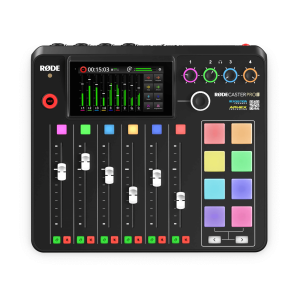
A mixer for Podcasters
The Rodecaster Pro is a great mixer designed with podcasters in mind.
It is a multi-track audio interface that can bring in a smart phone and a computer. The Rodecaster PRO 2 has four XLR microphone inputs with individual-level volume control.
It is a fully featured device that allows you to have full control of your show.
It is more pricey than some of the other options and takes up more desk space but this is the ultimate podcasting tool.
Who is this for?
Need a full featured mixer to run a complex showNeeds more than 2 people on microphones with remote guestsDesk space is not an issueNot recording on the road where a small setup is preferred.
More mixers for podcasting
Podcast Microphones
What is the best microphone for podcasting?
This is a well-debated topic.
Before we get into the actual microphones, we need to look at the different types of microphones.
There are many opinions on what podcast microphones are the best.
Choosing a podcast microphone is a very personal decision.
You will like the sound of your voice more on certain microphones and you won’t on others.
Condenser vs Dynamic Microphones
Condenser Microphones for podcasting
A condenser microphone is more sensitive and captures more of the ambient noise in the room. It is able to capture the full range of your voice and is the preferred type of microphone for voice-over work and professional audio recordings.
Condenser microphones need phantom power to be enabled on your audio interface/mixer.
You may need to treat your recording space with audio panels.
Popular Condenser Mics for Podcasting
Dynamic Microphones for podcasting
A dynamic microphone is less sensitive and generally picks up audio that is in close proximity to the microphone. The sound drops off significantly as you pull away from the microphone. It is more suitable for untreated audio recording environments.
Dynamic microphones are the most commonly recommended type of mic for podcasting. There are some dynamic microphones like the Heil PR40 that are wide diaphragm and are designed to sound like condenser microphones.
Popular Dynamic Mics for Podcasting
USB Microphones vs XLR Microphones
USB Microphones for Podcasting
USB Microphones plug directly into a computer (or smartphone via an adapter). You can record your podcast into a Digital Audio Workstation (DAW) or other podcast recording software like VoiceMeeter.
The benefit to USB Microphones are there is no need for an audio-interface or mixer.
The most basic podcast kit is a USB Microphone and a computer. That is it!
Popular USB Microphones for Podcasting
XLR Microphones for Podcasting
An XLR microphone is an analog microphone designed to plug into a mixer or audio interface.
In order to record your podcast you will need an audio interface to record into your computer or a digital recorder to record without a computer.XLR Microphones are preferred by many advanced podcasters because you can use them with an audio-interface and a digital recorder to achieve an all hardware recording system. This reduces the risk of losing a recording due to software crashes.
Popular XLR Microphones for Podcasting
EXTENSIBLE Microphones for Podcasting
The Samson Q2U,the ATR2100USB and the Maono HD300 each have USB AND XLR connections.
What is so cool about that? You can start with just one of these mics (and your computer). Just plug the mic into your usb port on your computer and you are good to go. The only expense you will have for podcast equipment will be an inexpensive microphone.
Later… when you expand your podcast studio you can buy an audio-interface or mixer and you will NOT have to replace your microphone because it also has an XLR connection.
Shway!
Popular Extensible Microphones for Podcasting
XLR Microphone Adapter for Computer
If you have an XLR Microphone but don’t want to purchase an audio interface or digital recorder like the Focusrite Vocaster Two or the Zoom Podtrak P4 then you can get an adapter that will allow you to plug your XLR cable into your computer.
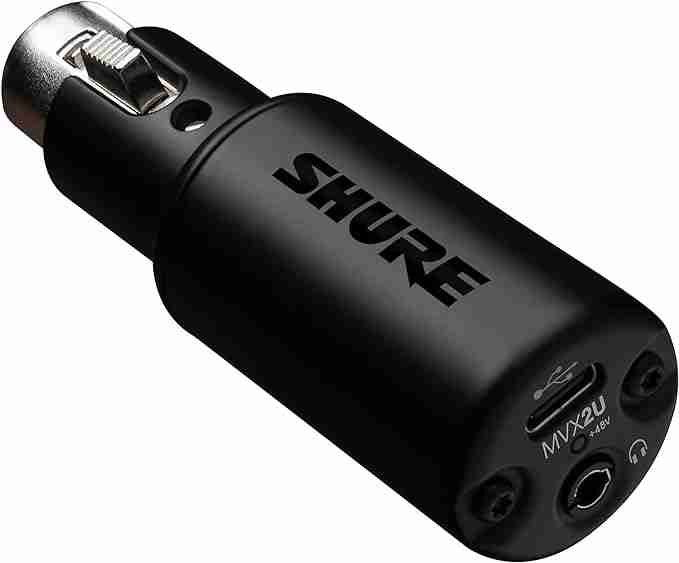
Personally, for about the same price you can have a multi-track digital recorder and stereo mix audio interface that allows you have up to FOUR XLR microphones plugged in at the same time with independent gain control and monitoring volume control. And +70db in gain… I chose the Podtrak P4 because it does so much more.
But if only want an adapter to go straight into your computer the SHURE MVX2U is the way to go.
Other Types of Microphones for Podcasting
Ribbon Microphones
Ribbon microphones are not commonly used for podcasting.
You need to be careful with phantom power because you can damage your microphone if you have phantom power switched on while your ribbon mic is plugged in.
Dynamic microphones don’t require phantom power but will not be damaged by it.
Shotgun Microphones
Shotgun microphones are typically used in video recording but some podcasters use them in their podcast studios.
Shotgun mics are front-load microphones that only pick up audio directly in front of the microphone.
Lightning Microphones
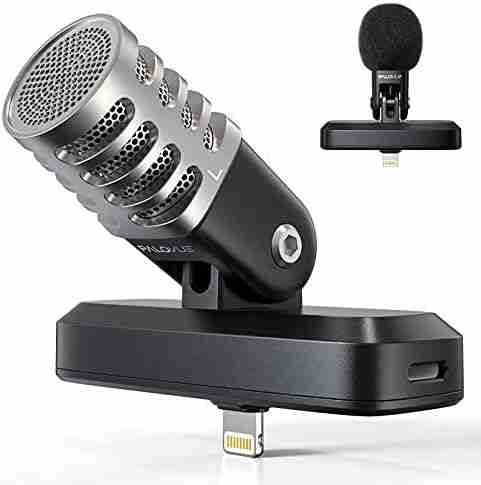
A lightning microphone is like a USB Microphone but instead of a USB port it has an Apple Lightning Connector port. Since Apple has moved to USB C connections you won’t see many Lightning microphones anymore.
Lavalier Microphones
If you are recording video and you don’t want a microphone in the frame then a Lavalier microphone is a good option. You can get lavalier mics that are condenser or dynamic and the quality varies.
Headset Microphones
Some people record their shows using a gaming style headset microphone. They aren’t the best quality audio but they are good enough.
I like headset microphones for inexperienced podcast guests who tend to move their mouth away from the microphone causing audio drop off. With a headset microphone you don’t have to worry about this because as they turn their head the microphone remains the same distance from the mouth.
Some interview based podcasts send their guests a headset mic prior to the interview so they don’t have to worry about poor audio quality.
Podcast Microphone Accessories
There are a lot of accessories for your podcast microphones. Some are highly recommended and others may not be needed depending on your podcast studio setup.
Pop Filters
Pop Filters help reduce the prevalence of popping P’s. A windscreen does the same thing but a pop filter does a better job. It is a good idea to have a pop filter or windscreen on your microphone.
Microphone Stands, Shock Mounts, and Boom Arms
Mic Stands or boom arms help position the microphone in a comfortable place for recording. A good mic stand is adjustable so you can use it at different heights and angles.
A shock mount attaches to the microphone and suspends it so that vibrations and bumbs don’t cause noise to get into your recording. Without a shock mount you will hear thuds and bumbs as people like to move around while recording.
Studio Monitoring Headphones for Podcasters
In order to monitor your recording, you need to use a good set of headphones. You can use earbuds but you won’t get the same quality isolation of sound to monitor clearly.
Your podcasting headphones should be comfortable and should not irritate your ears.
Headphone Amplifiers
If you have multiple co-hosts or in studio guests then you may want a headphone amp which will allow everyone to have headphones with individual volume control.
We used two ART HEADAMP4 headphone amplifiers for The Bunker Project podcast and they worked well to get all our guests their own headsets with personal control over volume. I still use one of them in my podcast studio today.
NOTE: If you chose an audio interface like the Rodecaster Series or the Podtrak P4 then you do not need a separate headphone amplifier as you get a built in amp with these devices.
Inline Microphone Preamps
If you choose a Dynamic XLR Microphone as your podcast microphone you may notice that you need to turn the gain way up on your audio interface or mixer. This is because dynamic microphones don’t use phantom power and require more of a signal then condenser microphones do.
Some audio interfaces have good built in preamps so you don’t need an inline microphone preamp but some podcasters prefer to get an inline preamp so they don’t need to crank the gain. This gives you a louder and quieter recording which is what we want for our podcasts.
The two most popular inline mic preamps for podcasting are the Cloudlifter and the Fethead.
Cloudlifter VS Fethead
What do inline microphone preamps do?
They take low output dyanmic or ribbon microphones and increase the gain so that you can have a louder, cleaner sound. You don’t have to turn the gain up so high and have a lower noise floor in your recording.
How do inline microphone preamps work?
They utilize the phantom power provided by an audio interface or mixer to boost the signal but do NOT pass on the phantom power through to the microphone. This is especially important when using ribbon microphones because phantom power will damage them.
Cloud Microphones Cloud Lifter
The Cloudlifter is essentially a steal box with one (or more) inputs and outputs. You take an XLR cable from your audio interface and plug it into the the input on the cloud lifter and then a second XLR cable goes from the output of the Cloudlifter to the microphone input.
The Cloudlifter provides 25 db of gain allowing you to get the same volume level at a lower gain setting on your mixer or audio-interface.
Triton Digital’s Fethead
The Fethead functions in much the same way as the Cloudlifter. It has an intput and output and uses the supplied phantom power to boost the gain by 27db without passing on the phantom power to the microphone.
The Fethead does not require an additional XLR cable as you plug one end of the Fethead directly into the XLR connection on your microphone. You attach your microphones XLR cable to the other end of the Fethead.
Which inline microphone preamp is better?
I’ve read multiple opinions on several forums and some people prefer the Fethead while others prefer the Cloudlifter. They both increase the gain by approximately the same amount. 25db for the Cloudlifter and 27db for the Fethead.
The Fethead doesn’t require the extra XLR cable and takes up less desk space which is nice. I am all for anything that reduces the amount of space and tangle of wires which is whey I switched from a mixer to an audio-interface.
If you have multiple microphones to boost the Cloudlifter may be the more econonomical choice because you won’t have to buy multiple devices.
More Microphone Pre-Amps (Boosters)
NOTE: If you have the Zoom Podrak P4, the Focusrite Vocaster One or Two, a Rodecaster or another good quality podcast interface then you might not need an inline microphone preamp because some of these devices already have +70db gain.
Audio Processing Hardware
If you have an audio interface that supports line inserts you can add audio processing equipment that will add compression, a hard limiter/gate, preamps and EQ.
In the past some podcaster’s used these devices but now there are all in one podcast mixers that include these hardware processing features built in.
DBX 286
The dbx286s Microphone Preamp and Channel Strip Processor is a popular device amoung podcasters because it has great preamps and an adjustable de-esser that reduces sibilance and distortion. The enhancer increases the detail and definition of the hish and low frequencies.
It can be expensive if you have multiple microphones because you need a separate dbx286 for each microphone.
MDX 4600
The Behringer MDX4600 MMULTICOM PRO-XL is a four channel compressor / limiter / gate.
You can use in line inserts to connect up to four microphones to this hardware processing device. You can add compression, expander / limiter and a gate to improve the sound of your show without using a digital audio workstation (DAW).
This device is discontinued but you can still find them if you look
APHEX Aurel Exciter / Big Bottom
The Aural Exiciter is a rack mount audio processor that supports two microphones per unit. It brings out detail and clarity that elevates your sound without adding level and enhances the quality of your recording better than using equalization.
The Optical Big Bottom adds a deep and powerful low frequency punch without the unwanted level boost you get from using an EQ.
It is a pricey add on to your studio but many people swear by the quality improvement they get from it.
NOTE: The APHEX audio processors are BUILT IN to the Rodecaster PRO series so you won’t need any extra equipment if you have a Rodecaster.
Audio Cart Hardware
The Elgato Stream Deck is a cool piece of hardware that has 15 LCD Keys that are fully customizable. You can program them to take virtually any action you want. For live video applications you can have a key switch scenes, launch an application, play media and more. Actions can be nested in folders so you can have as many actions as you need.
For podcasting you can program this unit to have your intro music, sound effects, voicemail feedback, out takes, and outro music. You can run a live show easier with this cool equipment.
Of course, this can be accomplished using software like PlayIt Cartwell or a mobile app, but if you want an all hardware podcasting solution then this is a great addition to your podcast studio equipment setup. And it does so much more than just an audio cart!
There are other products like the Loupedeck that do the same thing.
Podcast Studio Equipment
Podcast Studio Accoustic Treatment
If your podcast recording space (podcast studio) in your home or office is not conducive to good audio recording then you may need to look into treating the room with acoustic tiles or alternatives.
If your room contains a lot of flat walls, windows and hardwood floors then you will have reverb in your recordings. A dynamic microphone with a fethead or cloudlifter can help to reduce the room reverb but there are some other steps you can take to make your recordings sound better.
Carpet is better for podcast recording because it doesn’t reflect the sound as much. If you have hardwood floors look at getting a nice thick rug to put on the floor.
Bookshelves are great at diffusing the sound that otherwise would just reverberate throughout the room. If you can add bookshelves and other pieces of furniture that will help.
And finally, you can purchase acoustic tiles and place them on the walls which will deflect and absorb sound waves making a much cleaner sounding recording studio.
If you don’t have the budget for acoustic tiles you can use moving blankets (or equivalent) and hang them on the walls while recording.
We used moving blankets at when recording the Bunker Project podcast in the back room of a bar in downtown Vancouver. It helped quite a bit.
Teleprompters for Podcasting
A teleprompter can be useful especially if you are doing a video podcast or repurposing your podcast audio show for Youtube or TikTok videos.
Studio Lighting for Podcasters
If you are video podcasting or creating shorts for Youtube or another platform then good lighting is very important. It also makes your zoom meetings more professional.
Elgato makes some great studio lights but there are other options too.
Studio Overhead Mounting Systems
When you are first starting out you don’t need a ton of extra gear. You can start with only a simple USB microphone and if you decide you like creating podcasts then you can expand your studio.
Once you reach the point of no return then you might want to consider an overhead mounting system. I recently got mine for my birthday and I love it. It gets my light stands and my Zoom Podtrak P4 and cameras and phones off my desk and frees up all that room.
There is something to be said about having a clutter free workspace with out light stands, camera stands, interfaces, phones and cables everywhere.
Definitely recommended once you are commited to creating content.
Take the Quiz


Listen Today!
As part of NaPodPoMo I’m planning a Daily Podcast for the month of November, 2024.
NATIONAL PODCAST POST MONTH
30 PODCASTS | 30 Days
NOVEMBER 1 – 30th